Have you ever wanted your favourite video downloaded from internet to your PC to watch on your handheld devices, like Cell Phone or iPod or PSP etc. but never found out how? If yes, then the wait is over!
There are several software that convert media files from one format to another. Here I am going to tell you about a free software for this purpose,
Format Factory.
Format Factory (FF) is not only a media file converter but also a basic video editor cum DVD/CD to iso converter and so on, the list is huge! It supports a lot of codec and uses them efficiently to do the job it is assigned to. The interface is easy enough for a newbie and also exciting for the advanced. take a look at the screenshot below
It is easy to find the necessary menus and settings, the percentage completed and the ongoing task.
FF can handle any format you are known to, name it!
For example: supported video codecs are 3gp, rmvb, wmv, mkv, mpg, flv, mov, gif, vob, swf. Supported audio codecs are mp3, wma, flac, aac, mmf, amr, m4a, m4r, ogg, mp2, wav, etc. Supported picture formats are jpg, png, ico, bmp, gif, tif, pcx, tga.
You can extract your DVD videos into your favourite format as well as your music CDs to your desired audio format. Ever wanted to have a built in iso converter on your computer? FF gives you just that. It converts iso into cso and vice versa. Also converting DVD contents into iso is just a few clicks away.
Here I am showing you how to convert a video from one format to another.
First Select the video tab on the left side menu. Here you'll find various convert to options, like 'All to 3gp, All to mp4" etc. Choose your preferred one. A new window opens.
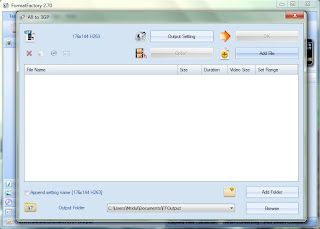
On the new window you can see buttons showing various options like 'output settings', 'add file' etc. Output settings used to set the properties of the output file. Click it and a new window emerges.
In the output settings window you can change the quality and size of the video as well as the audio. In the advanced menu you can rotate the video to your desired angle too. However change according to your preference and click ok.
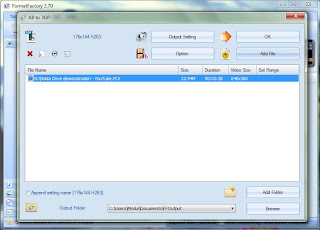
Now click the 'Add File' button. A new explorer window opens which shows all supported media files. Select the file you want to convert and click open. The left side window will show up. Click OK.
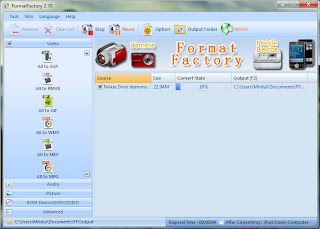
The main window shows up. Now click the start button, marked with a green arrow, which reside below the menu bar. Now the start button turns into 'Pause' button and converting starts. The bottom bar shows the elapsed time and also the option to shut down the computer after converting with a check mark. When the task is completed a pop up message on the extreme right bottom side informs the completion.
There are more to explore with this software. But here i just posted a very basic operation.
You can download Format Factory by clicking the following
here. The downloaded file is a zip file which needs to be extracted. Download, Extract, Install and Enjoy.
For more information click
here.


